The Everyday Attendance Problem for Private Tutors
Why attendance tracking gets messy for home tutors and private teachers, what a good tutor attendance app should include, and how Tuition Tracker: Attendance handles monthly class targets, missed classes, and history.
By Md Minaruzzaman Shovon · · 9 min read
Key takeaways
- Private tutors usually track attendance alone, across notebooks, spreadsheets, calendars and memory, so monthly class counts drift.
- The core questions each month are: how many classes are done, how many are left, which were missed, and what happened in past months.
- A good tutor attendance app needs per-student monthly targets, weekly schedules, one-tap attendance, a monthly calendar, history, and backup across devices.
- Tuition Tracker: Attendance is an Android app built for this workflow, with Days Done / Days Left counts, Month-End History, WhatsApp Quick Connect and Google cloud sync.
On this page
- Why is attendance tracking difficult for private tutors?
- Keeping track of monthly classes
- Different students have different schedules
- What happens when a student misses a class?
- Why using memory alone does not work well
- Notebook vs. spreadsheet vs. a tutor attendance app
- Keeping attendance records available across devices
- Staying connected with students and parents
- Reviewing previous months
- What should a good tutor attendance app include?
- This is the problem Tuition Tracker: Attendance is designed to solve
- Why a small administrative task deserves a better solution
Being a private tutor is not only about teaching a lesson and moving on to the next student. Behind every class, there is a small amount of administration that has to be managed: student schedules, class dates, attendance, missed classes, monthly targets, and the number of lessons still remaining.
When a tutor has only one or two students, remembering these details is usually easy. But as the number of students increases, attendance management can quickly become a daily headache.
A tutor might teach five, ten, fifteen, or even more students during a month. Each student may have a different schedule. One student might have classes three days a week, another might have two classes per week, while another may have a completely different arrangement.
Then real life happens.
A student may miss a class. A tutor may need to cancel a lesson. A class may be rescheduled to another day. Sometimes a lesson is completed but the tutor forgets to record it. At the end of the month, these small gaps in record-keeping can make it difficult to know exactly how many classes were actually completed.
This is one of the reasons many private teachers look for a tutor attendance app or student attendance tracker that can make the process easier.
Why is attendance tracking difficult for private tutors?
Private tutors often do not have access to the attendance systems used by schools, colleges, or large coaching centers. They are usually managing everything themselves.
A simple notebook may be enough in the beginning. A tutor can write down student names, class dates, and attendance marks. But after several weeks, finding an old record can take time.
Some tutors use Google Sheets or Excel. These tools are powerful, but they can also be more complicated than necessary for something as simple as marking whether a student attended today's class.
Others rely on their phone's calendar, reminders, messaging apps, or memory.
The problem with these approaches is that attendance information can become scattered across different places.
One student's schedule might be in a calendar. Another student's missed class might be mentioned in WhatsApp. Monthly class counts might be written in a notebook. The tutor may then have to mentally combine all of this information to understand the current situation.
A dedicated attendance app for private tutors brings those everyday tasks into one place.
Keeping track of monthly classes
For many private tutors, attendance is closely connected to a monthly class target.
For example, a tutor may agree to teach a student 12 classes during a month. After several weeks, the tutor needs to know:
- How many classes have already been completed?
- How many classes are left?
- Which classes were missed?
- Is the student on schedule?
- What happened during previous months?
Without a consistent record, answering these questions may require manually counting dates in a notebook or spreadsheet.
A student attendance tracker for tutors can make this process much simpler by keeping attendance connected to the student and the month.
Instead of treating every class as an isolated event, the tutor can see the student's monthly progress and quickly understand how much teaching has already been completed.
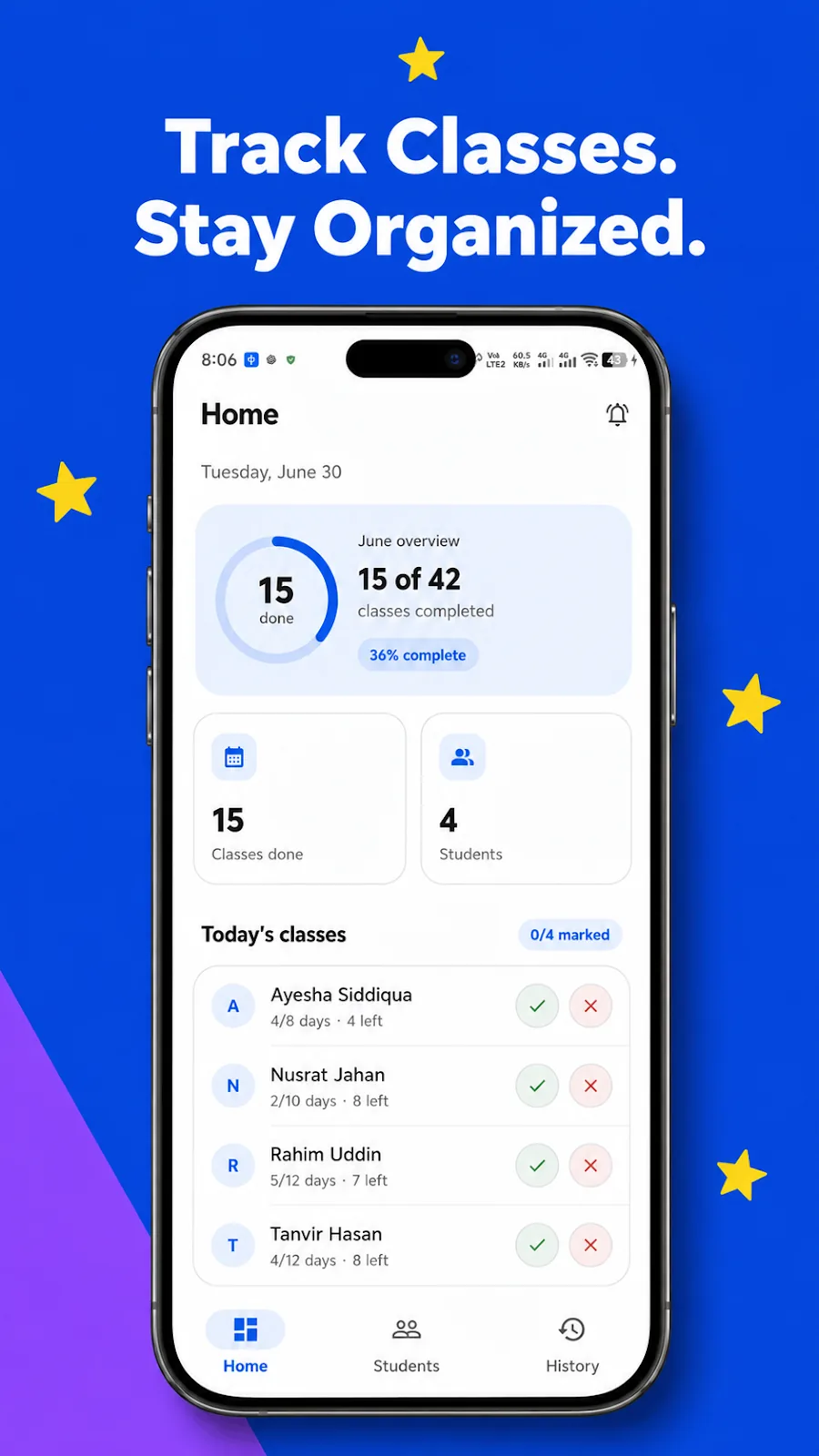
This is the basic idea behind Tuition Tracker: Attendance: make it easier for home tutors, private teachers, and coaching instructors to keep track of students, attendance, schedules, and monthly class progress. You set a monthly class-day target for each student, mark attendance day by day, and let the app handle the counting, with Days Done and Days Left always visible.
Different students have different schedules
Private tutoring rarely follows one universal timetable.
A tutor may have:
| Student | Weekly schedule |
|---|---|
| Student A | Sunday, Tuesday, Thursday |
| Student B | Monday, Wednesday |
| Student C | Friday, Saturday |
Managing these schedules manually can become confusing, particularly when a tutor has several students.
A tutor may remember today's first student but forget another student's class later in the evening. This is where a tutor schedule and attendance app can be useful.
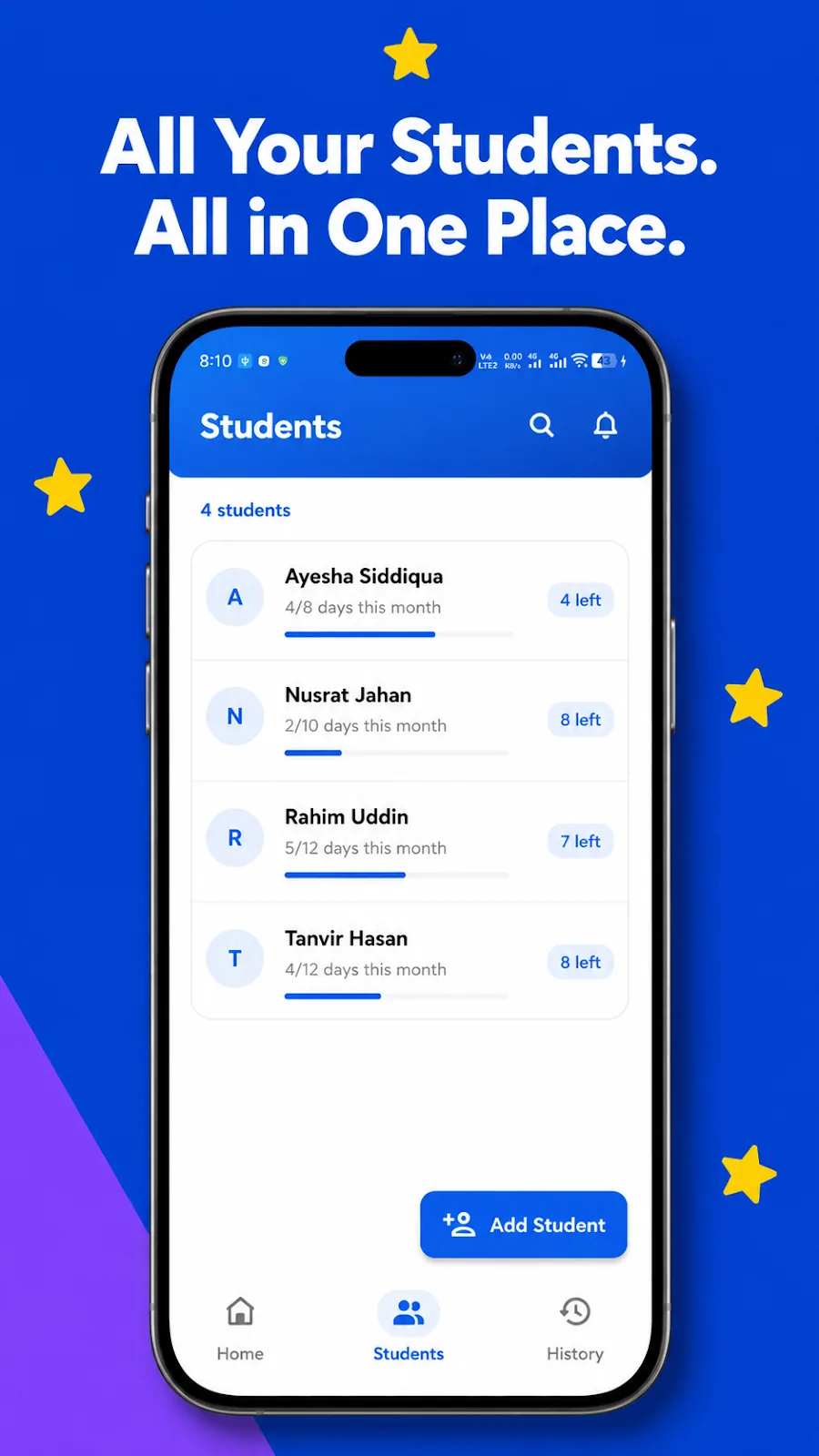
Tuition Tracker: Attendance is designed around this type of recurring tutoring workflow. Tutors can add students with their subject details, specify a monthly class-day target, and optionally add the weekdays on which they normally teach each student.
What happens when a student misses a class?
Missed classes are another common source of confusion.
Suppose a tutor normally teaches a student 12 times in a month. The student misses two lessons. The tutor may later need to determine whether those missed lessons were rescheduled and how many classes have actually been completed.
Without a consistent attendance record, it is easy to lose track.
Recording attendance immediately after a class creates a much clearer history. Instead of trying to remember what happened several weeks ago, the tutor can look at the student's attendance record.
Tuition Tracker: Attendance allows tutors to mark a class as Present or Missed with one tap from the home screen, or use the interactive monthly calendar on the student's profile.
Why using memory alone does not work well
Experienced tutors often know their students very well. But attendance management is not really a memory problem. It is a record-keeping problem.
When a tutor teaches multiple students every week, there are simply too many small details to remember perfectly.
You may remember that you taught a student "around three times last week," but was it three or four?
You may remember that a class was cancelled, but did you record it?
You may remember that a student missed a lesson, but which date was it?
These questions become particularly important when calculating monthly classes.
A digital attendance record gives the tutor something much more reliable than memory.
Notebook vs. spreadsheet vs. a tutor attendance app
There is nothing wrong with using a notebook. Many tutors have successfully managed their students this way for years.
The issue is convenience.
| Notebook | Spreadsheet | Tutor attendance app | |
|---|---|---|---|
| Marking a class | Write it by hand | Edit a cell | One tap |
| Counting monthly classes | Count manually | Needs formulas | Automatic |
| Finding old records | Flip through pages | Search sheets | Month-by-month history |
| Switching phones | Not applicable | Depends on setup | Cloud sync |
A notebook requires manual counting and searching. A spreadsheet offers more flexibility but may require formulas, formatting, and regular maintenance. A general calendar is useful for scheduling but is not necessarily designed around student attendance and monthly class progress.
A dedicated private tutor attendance tracker sits somewhere in between. It can keep the process digital without turning a simple attendance task into complicated administration.
The goal isn't to add more technology to a tutor's day.
The goal is to remove unnecessary work.
Keeping attendance records available across devices
Another practical issue for modern tutors is device changes.
A tutor may start managing students on a phone and later want to check the same information from a tablet. Losing attendance records when changing phones can be especially frustrating.
The current version of Tuition Tracker: Attendance addresses this with Google sign-in and cloud sync, so student data is backed up and kept in sync across your phone and tablet.
That makes the app useful not only as a simple attendance counter, but also as a central place for keeping ongoing tuition records.
Staying connected with students and parents
Attendance management is also connected to communication.
If a student misses a class, a tutor may need to contact the student or a parent. Normally, that means leaving the attendance app, finding the person's number, opening another application, and starting the conversation.
Tuition Tracker: Attendance includes Quick Connect options that let tutors call or send a WhatsApp message from a student's profile without having to save the number in the phone's contacts first.
It is a small feature, but it fits naturally into the tutor's daily workflow.
Reviewing previous months
Monthly attendance records become more valuable as time passes.
A tutor may eventually want to check what happened with a student last month or compare the current month with previous teaching records.
Keeping old information only in a notebook can make this inconvenient. A digital history makes it easier to look back when needed.
Tuition Tracker: Attendance includes a Month-End History feature that lets a tutor close out a student's month and save an attendance snapshot. Past months are archived and stay viewable any time in the History tab.
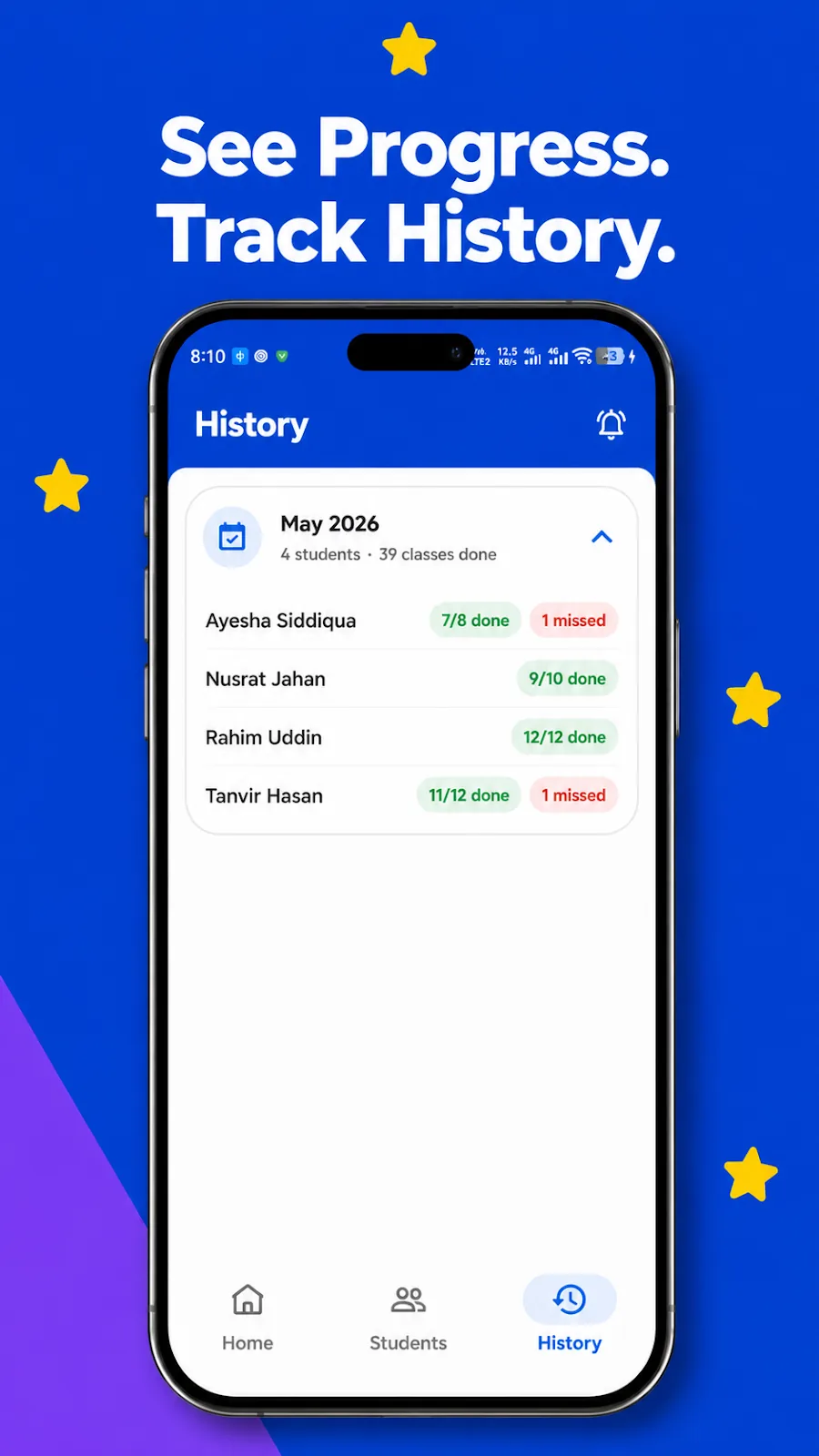
This means the attendance record does not simply disappear when a new month begins.
What should a good tutor attendance app include?
A useful attendance app for home tutors does not necessarily need dozens of complicated features.
The most important functions are the ones that solve the tutor's everyday problems.
Ideally, a tutor attendance app should make it easy to:
- Add and manage students
- Set a monthly class-day target
- Record the student's subject information
- Keep track of weekly teaching days
- Mark attendance quickly
- View attendance on a monthly calendar
- See classes completed and classes remaining
- Keep historical attendance records
- Contact students or parents when necessary
- Keep records backed up and accessible across devices
These are the practical details that matter when an individual tutor is managing several students at the same time.
This is the problem Tuition Tracker: Attendance is designed to solve
Tuition Tracker: Attendance was built around this everyday problem.
The concept is straightforward: give home tutors, private teachers, and coaching instructors a dedicated place to manage their students, track attendance, follow monthly class targets, and review their teaching history.
Rather than trying to become a complicated school management platform, the app focuses on the recurring workflow of individual tutors.
- You add your students.
- You define how many class days you expect during the month.
- You keep track of the days you teach.
- You mark attendance.
- The app keeps count of the classes completed and the classes remaining.
- When the month is finished, you keep the record for future reference.
It runs on Android 7.0 and up, and comes with light and dark modes for teaching day or night.
If you are a private tutor looking for a simple way to organize tuition attendance and monthly class tracking, you can try Tuition Tracker: Attendance on Google Play.
Why a small administrative task deserves a better solution
Attendance may look like a small part of tutoring, but small administrative tasks repeated every day eventually consume time and attention.
A tutor might spend only a few minutes checking schedules, counting classes, searching for old records, or figuring out which lessons remain.
Over weeks and months, those small interruptions add up.
More importantly, unclear records can create unnecessary confusion.
A clear attendance history gives tutors a better understanding of what has actually happened with each student and how much teaching remains for the month.
For a private tutor, the objective is simple:
Teach the student. Record the class. Know where things stand.
That is the everyday problem a dedicated tutor attendance app is designed to solve, and that is the purpose behind Tuition Tracker: Attendance.
Frequently asked questions
What is Tuition Tracker: Attendance?
An Android attendance tracker for home tutors, coaching centers and private teachers. You set a monthly class-day target for each student, mark attendance day by day, and the app counts classes done and classes left.
Can I record a missed class?
Yes. Each class can be marked Present or Missed with one tap from the home screen, or from the interactive monthly calendar on the student's profile.
Will I lose my records if I change phones?
No. You sign in with Google and student data is backed up to the cloud and synced across your phone and tablet.
What happens at the end of the month?
Month-End History lets you close out a student's month and save an attendance snapshot. Past months are archived and stay viewable in the History tab.
Can I contact a student or parent from the app?
Yes. Quick Connect lets you call or send a WhatsApp message from a student's profile without saving the number to your contacts.
Which Android versions are supported?
Android 7.0 and up.